It seems to us players Apple iPod Shuffle and Nano series, available in different color categories, and may soon join iPhone. The website of the American mobile operator AT & T in the list of supported devices appeared very interesting point, the phone iPhone, executed in red flowers (deep red).
iphone-deep-red-stock-sheet
Official information about the new phone's no coloration, the only thing that is known about the device-volume internal phone memory is 4 gigabytes. Among the skeptics immediately appeared view that this is the remnants of 4 Gbaytnyh versions of the phone, Apple simply that the company decided to recolor and dorasprodat coming to a Catholic holiday of Christmas and New Year. An interesting suggestion, because at the holidays pokrasnevshie phones razletyatsya as hot cakes, even despite the relatively small amount of memory.
Nov 11, 2007
A red iPhone?


Diamond iPod in just 300 euros
Can these diamonds decorated player iPod cost only 300 euros? Yes, without problems is just precious kamushkov should not be fifty-, and three to four.
Diamond iPod
This is the player and established designer John Harrington. His creation is not bails out of the hands under the weight of the gold shell, and hundreds of diamonds, a modest and looks fine. That luxury does not need to talk, because beauty is not specified price.
Otherwise, this player is no different from their fellow plastic and platinum.
Puppet grant for Barbie
We all rosy stylish, with chupa-chupsom mouth is not going around, pink fluffy slippers rarely wear. But sometimes feel like just a little girl and poskandalit to Pope bought column for the iPod in Barbie- style.
Barbie iPod speaker dock
Should the little girl have iPod, it is a different matter. But the 70-dollar grant from the girl simply obliged to be. No matter what the quality of the sound they issue, it is important - as they look. Radom with them, and you can put chupa-chups and pink fluffy slippers.
Philips has released acoustics for the iPod and Nokia phones
Do owners MR3-telefona Nokia or iPod player has another reason not to part with beloved music. With the help of acoustic systems from Philips any place can be turned into a powerful stereo zone.
Portable sound systems Philips SBA 160 and SBA 161 (in black and white flowers respectively), designed for use with Nokia phones. The source of sound in them is highly protected from interference digital amplifier Class D. According to Philips, as compared with conventional audiousilitelyami Class D digital amplifier efficiency is higher at 90%. In addition, the developers have provided audio integrirovanoy embedded with a radio antenna.
Philips-1
Philips is not avoided the attention and listen to music lovers at the iPod player. The devices SBD 6000 and SBD 8000 radically different design-white and black box circles. But it is equally well they can reproduce realistic three-dimensional sound.
Philips-2
Audio does not tie the user to a wall outlet, and they can eat from batteries, connecting to the phone via an adapter. For example, Philips SBA 160 and 161 can operate autonomously to 25 hours from four AAA batteries form, and more powerful Philips SBD 6000 until 10 hours from six AAA batteries.
Philips SBA 160 and SBA 161 available for sale in Russia in November on the recommended retail price of 2499 rubles. Their detailed technical specifications can be found here.
Philips SBD 6000 is available for sale in Russia in November on the recommended retail price of 4499 rubles. Philips SBD 8000 is available for sale in Russia in November on the recommended retail price of 7999 rubles. Full technical specifications Philips SBD 6000 can be downloaded from this link, and SBD 8000 - this link.
Nov 4, 2007
How to convert YouTube, limewire, DVD, flash and any video to iPod touch/classic/nano/video?
The article includes six parts.
Part 1:Rip DVD movie to iPod touch/classic/nano/video (Windows)
Part 2:Convert AVI, WMV, MPEG, RM, RMVB, ASF, MOV, DivX, XviD, MPG to iPod touch/classic/nano/video MP4 or H264 format (Windows)
Part 3: Rip DVD movie to iPod touch/classic/nano/video (Mac)
Part 4:Convert AVI, WMV, MPEG, RM, RMVB, ASF, MOV, DivX, XviD, MPG to iPod touch/classic/nano/video MP4 or H264 format (Mac)
Part 5:Convert flash, swf to iPod touch/classic/nano/video (Windows)
Part 6:Convert youtube video to iPod touch/classic/nano/video (Windows)
It is easy-to-use and the converting speed is fast! After testing, all formats to iPod conversion works well, the output audio and image quality is excellent! Let's view the steps.
Part 1: How to rip DVD to iPod (Windows)
1. Download the latest version DVD to iPod Converter + iPod Movie/Video Converter Suite, and install it. You can download about it by referrring here. 
2. Run the DVD to iPod Converter, load your DVD by clicking 'Open DVD' button or choosing 'Open DVD' from 'File' drop down menu. One or several titles appear in the list after loading DVD. 
3. As usual, the longest title is the main file of the movie. You can remove the title you don't like to convert by unchecking the title. Set 'Subtitle', 'Audio Languages' to what you like.
4. To 'Output Folder', Enter the full pathname or choose the path where you want to save your video files by clicking the related button.
5. Click 'Convert' button to start the iPod DVD conversion.
6. Find the .mp4 file that DVD to iPod converter created and drag it into your iTunes library, or select 'Add File to Library' from the 'File' menu and select the encoded movies. Now you can watch it with iTunes or Quicktime Player on your PC.
Tips: Download iTunes 7+quicktime Player package from http://www.apple.com/quicktime/download/win.html 
7. Load the MP4 files to iPod by clicking 'File -> Update iPod'. Now, you can enjoy the movies on your fifth generation video iPod anywhere and anytime.
Part 2 : How to convert iPod video, such as AVI to iPod, WMV to iPod, MPEG to iPod, RM to iPod, RMVB to iPod, ASF to iPod, MPG to iPod, DivX to iPod, XviD to iPod video using "cucusoft iPod Video Converter + DVD to iPod Suite". (Windows)
1. Download the latest version DVD to iPod Converter + iPod Movie/Video Converter Suite, and install it. You can download about it by referrring here.
Related download
* To convert RM/RMVB real media files to iPod, Maybe need to install Realplayer:
http://www.real.com/freeplayer/?rppr=rnwk
* To convert WMV, ASF to iPod, Maybe need to install Windows Media Player:
http://www.microsoft.com/windows/windowsmedia/default.mspx
2. Run iPod Video converter component. And load the video files you'd like to convert by clicking 'Open file' button. 
Click 'Output' and choose the pathname where you want to save your video files. Click 'Convert' to start converting video to iPod MP4 or H264 files.
Tips: Before converting, you can click 'Advance -> Video settings' to set 'Video format', 'Resolution', 'Framerate', 'Output Quality'. If you'd like to convert video to H264 files, please set 'Video format' to 'H.264 FQ Variable Bitrate'. 'MPEG4(.mp4) FQ Variable Bitrate' is the default value. Certainly, you can also set 'Audio Bitrate', 'Channels', 'Sample Rate' and 'Volume' in 'Audio Settings' page. 
As usual, we set "Resolution" as "320x240" (i.e. default settings), certainly you can also choose other video sizes you like.
3. After converting, you can open the output folder to check and play the iPod video files (.mp4 or .mov) using Quicktime Player (Freeware, Quicktime Player+iTunes downloading address http://www.apple.com/quicktime/download/win.html ).
4. Transfer the iPod videos to iTunes by draging or clicking "File -> Add File to Library". Now, you can enjoy them on iTunes. Then hit "File -> Update iPod" to sync to your iPod.
Troubleshootings (Windows)
1. Why occour a message: 'MPEG2Dec: Error during decoder initialisation' or 'unable to read from E:\VIDEO_TS\vts_01_1.vob' everytime I put any DVD in?
Check that you select the correct DVD driver. If not, please select the correct DVD driver path.
2. Audio is out of sync with the video or no audio
There are several posts which says audio is out of sync with the video or no audio at all when they used videora ipod converter, cucusoft dvd to ipod converter or pqdvd dvd to ipod video converter. It seems that there is no software can work well for ALL users and ALL DVDs.
In fact, you might as well resolve the problem trying the following one by one.
A. DVD to iPod Converter: Click "Setting -> Input settings".
(a) Check "Audio/Video Synchronisation".
( Set "Deinterlace filter" to "None".
© Set "Output frame rate" to other values.
B: iPod Video Converter: Click "Advance", change 'framerate' to 23.976 or 29.97 in 'Video settings'.
If it doesn't work, might as well change a DVD movie to test.
3. Still doesn't Work
iPod official support page: http://www.apple.com/support/ipod/
iTunes official support page: http://www.apple.com/support/itunes/
Part 3 : How to directly convert DVD to iPod video (Mac OS X)
DVD to iPod Converter for Mac can rip DVD movie to iPod straight with high video quality. It supports converting an entire DVD to one iPod video file, and also supports ripping any segment by setting "start time" and "end time".
Download the latest Mac DVD to iPod Video Converter , insert the DVD movie you'd like to rip into the DVD drive, click "DVD" button to load your DVD, select the output format and set the optional parameters, then hit 'Convert' to start the iPod DVD conversion process. 
Part 4: How to convert video to iPod (Mac OS X)
iPod Video Converter for Mac can not only convert AVI, MOV, MPEG, DivX, WMV, VOB, XviD to iPod video MP4, but also extract/convert media files to iPod audio M4a, MP3 on Mac.
It is easy to use. Just download Mac iPod Video Converter , load your video files and convert by pushing several buttons. 
Part 5: How to convert flash, swf to iPod
1. Download flash to iPod Converter from here, intall and run.
2. Click "Add Flash", load your Flash (.swf) movie or video files.
Tips: You can play the swf file by clicking "Play" button. 
3. Click "Convert Now!" to start converting swf flash to iPod mp4 video format.
Tips: (optional) Before converting, you might as well set "Output folder" to somewhere you like.
Trouble Shooting: No audio or the audio is low
If you play the iPod video files you converted and find that audio is a little bit lower or there is no audio at all, please check your Volume control for your audio device and select "Stereo Mix" or "Wave out Mix" as the recording source in the Recording Control window, and then reconvert.
a) Right Click the "Volume" button in the taskbar, choose "Adjust Audio Properties". Go to "Audio" tab, click "Volume" from "Sound Recording" area.
c) Select "Wave out Mix" or "Stereo Mix". 
Part 6: Convert youtube video to iPod (Windows)
Sena Cases Launches New iPod Cases
If you are the proud owner of a new iPod like the iPod touch or classic, Sena Cases has some cool cases to help protect your iPod investment. Sena announced a new line of luxury leather cases for iPod today that include cases for the iPod touch, classic and nano.
The iPod touch gets cases made from hand crafted leather including the Elega Pouch, LeatherSkin, and MagnetFlipper priced from $26.00 to $52.00. The Classic gets new dockable cases that allow docking of the iPod without removing the case, premium stand that provides a stand for viewing video on the iPod hands free, and the MagnetFlipper with prices around $50.
The iPod nano gets a new UltraSlim case priced at $18.00. the Sena cases are available now at the Apple store or the Sena store.
Via Sena Cases
Download dads lead the iPod generation
From the obsessive indie record collector flicking through the 12-inch racks, to the much-derided figure of '50-quid man' (the middle-of-the-road fiftysomething bloke with plenty to spend in HMV), music fans have always been addicted to 'product', from vinyl to CDs.
It's all very well the likes of Radiohead releasing their latest misery-fest online, but music lovers want shiny discs to clutch, artwork to admire and lyric sheets to pore over. Or do they?
After more than two decades, I kicked my weekly CD-buying habit three months ago and haven't been in a record shop since. I subscribe to Napster To Go (£14.95 per month), which allows me to download as much music as I want onto my computer and transfer those files onto my MP3 player. Before, in an average month, I used to spend £50 on music. Now I save myself £35.05 (and can listen to much more stuff).
But far from being a '50-quid man', Eamonn Forde, editor of the music business title Five Eight, thinks people like me are 'opinion formers', which is reassuring. 'We reckon 15 per cent of music sales are digital at the moment,' he says. 'The singles market has yet to impact upon the album market and that's where most of the margin is for the industry.'
The omnipresent iTunes has triumphed over its digital-market competition, providing three-quarters of online sales. But it isn't the only show in town: there is a huge amount of competition, not just on price but on service.
iTunes is an a la carte model: you see the track you like and pay your 79p. A big drawback with iTunes is that it has inbuilt digital rights management (DRM), which prevents you playing 'your' music on anything other than an iPod, although iTunes has begun to introduce some DRM-free tracks. On Napster, you can listen to your chosen music for as long as your subscription is valid, including music stored on your MP3, but it too is not 'your' music (you can't burn it off your computer onto CDs).
By contrast, with the website eMusic you can download 30 tunes a month for £8.99 or 75 for £14.99 (that's 20p a track). Not only is that a lot cheaper than many of its bigger rivals, but eMusic is DRM-free. Everything is sold in MP3 format, so your music is compatible with any device, not just an iPod. The service has more than 300,000 subscribers and its business in the EU has increased 110 per cent since 2006.
'As more labels choose to sell their tracks in the open MP3 format, enabling compatibility between devices, and more retailers can offer those tracks, we believe the market will expand,' says eMusic chief executive David Pakman.
UK-based website Wippit once claimed to be the world's first legal peer-to-peer file-sharing service, but has since moved to a less controversial download model. It says it has 184,000 users, three-quarters of whom are in the UK. The subscription is £4.99 a month, or £50 for a whole year and, unlike Napster, you get to keep the tracks you download. 'If you download an album every two months, then you have already broken even,' says chief executive Paul Myers. 'If you buy more, then it's a real bargain.'
Yet, according to research by the International Federation of the Phonographic Industry and analyst Jupiter Research, only one in 20 downloads is actually paid for. 'The under-24s wouldn't dream of paying until they start "hitting the barrier" - which is when they begin to have children, responsibility and less time,' Myers says.
The UK music industry has taken a 'gently, gently' approach to policing a generation of illegal file-sharers since 2004 when the BPI, Britain's phonographic industry body, launched 150 cases, most of which settled for around £2,000. Certainly it's been quiet compared to the more gung-ho approach in the US, where more than 20,000 lawsuits have been brought in the past four years, including one last month against 30-year-old Jammie Thomas, who allegedly held a Kazaa account on which 24 songs were available for download. The jury found she should pay $9,250 per song.
So the generation driving the legitimate online music revolution is 'a lot older than you would think,' says Ben Drury, managing director of 7digital.com. Most users fall into the 25-to-34 age bracket, then 35-to-44, with the under-24s in third place, he says. 'Younger people are much more likely to download illegally - they're cash-sensitive, price-sensitive, more technically able and maybe have more time to search the peer-to-peer services.'
Myers is more precise: 'Our average customer is a 34-year-old male. It's not the kids, as everyone thinks.'
It sounds suspiciously like '50-quid man' has been more willing to move with the times than his image suggests.
Oct 28, 2007
DTS-HD Master Audio Finally Hits the Mainstream
Earlier this month, in a swank New York penthouse apartment, DTS invited a few of their closest friends (plus the usual crew of journalists, analysts and hangers-on) to celebrate the official arrival of their new lossless audio codec, DTS-HD Master Audio. And if that doesn't mean anything to you, well it should, because with DTS-HD Master Audio, you can hear exactly what was laid down in the movie or music studio - up to 7.1 channels of sound encoded at 96KHz with 24 bits of precision - right in the comfort of your own home.
DTS-HD Master Audio is an optional sound format on both Blu-ray Disc and HD-DVD. But until now, it has been difficult to actually hear DTS-HD Master Audio at home as very few players of either format include native decoding, nor was it previously possible to pass the sound digitally to a receiver or surround sound processor for decoding, due to its relatively high bandwidth. But all that has changed with the advent of HDMI version 1.3 and the latest generation of HD-DVD players, Blu-ray Disc players and surround sound receivers from companies such as Samsung, Sharp, Toshiba, Panasonic, Onkyo, Integra, Yamaha, Pioneer and others. These new players and receivers can actually extract all those digital bits from a shiny silver disc and turn them into heavenly music (or movie sounds, as the case may be).

Audiophiles around the country rejoice as a new light illuminates on their receivers!
In a "real world" demo, the DTS crew were spinning DTS-HD Master Audio tracks on a Toshiba HD-A35 HD-DVD player and a Samsung BDP-1400 Blu-ray Disc player with its firmware upgraded to pass the digital bitstream to a compatible receiver. In this case, that compatible receiver was a Yamaha model RX-V3800, capable of decoding DTS-HD Master Audio (and DTS-HD High Resolution Audio) from an HDMI 1.3 digital bitstream. For speakers, DTS chose powered Genelec studio monitors (seven of them) along with a powered Genelec subwoofer. Total system cost came in under $7,500, including the LG Flat Panel HDTV, speakers and all electronics.
Tracks were ones I'd seen and heard before at trade shows, some great sounding material from Peter Gabriel, Pat Metheny and Omar Hakim, plus movie cuts from "Ice Age: The Meltdown" and "Fantastic Four." What was different this time was that I was hearing it on off-the-shelf components, not prototype players or computer-based decoders. A little while later I popped the same demo disc into a new Blu-ray Disc player we have in for review (details to follow this Tuesday), and finally saw that "DTS-HD MSTR" light up on our Integra DTR-7.8 receiver.
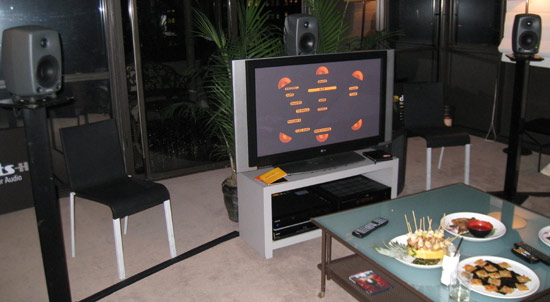
Ah nothing says "PARTY" like finger food, a fine Cabernet and 7.1-channel lossless surround sound.
In terms of sound quality, DTS-HD Master Audio is capable of incredibly detailed reproduction of original recordings, and the better the original recording, the better it will sound via DTS-HD. Like its competitor, Dolby TrueHD, DTS-HD Master Audio uses a form of lossless compression which maintains the full resolution of the original recording, yet does so with less storage space (and lower transmission bandwidth), when compared to the original uncompressed PCM tracks.
These storage and bandwidth savings are quite important on both Blu-ray Disc and HD-DVD which are currently limited to 50 GB and 30 GB per disc, respectively. Once you squeeze in a full 1080p video transfer, special features, commentary tracks, deleted scenes, documentaries and online interactive games, there isn't much room left for audio -- in many cases, a full uncompressed PCM audio track just won't fit. So if the content creators (e.g., film directors, record producers, etc.) want to deliver the best possible audio experience to go with the HD video, then lossless codecs such as DTS-HD Master Audio are an attractive option.
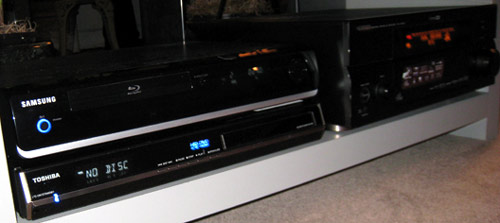
Samsung, Yamaha and Toshiba are among the first to support DTS-HD, but is that Toshiba HD-DVD player making a comment on current software availability perhaps?
The only drawback right now is the lack of available titles which exploit the new format. Although DTS-HD Master Audio has made its way onto several HD-DVD discs in Europe, only a few titles in the US market are currently available with DTS-HD Master Audio tracks. But now that the hardware is available to play it back, things can only get better. And let's hope they do, because DTS-HD Master Audio is something you just have to hear to believe.
iPod Inside: Standard features of Apple MP3 players
Munich - Mini, nano, or classic: no matter what the flavour, iPods are bestsellers. Many love the design Apple's portable music players while others swear by the simple controls. The database system, which prevents any software but iTunes from stocking the player, is not to everyone's taste, however. Adventurous types can try their luck with alternative software. They allow for individualization of the player and the installation of additional applications.
iPod-Linux is free software that provides users with more than just another way to fill up the database: for friends of mobile gaming, for example, there is a Gameboy emulator called iBoy. The standard user interface for Linux is available in a palmtop format called podzilla. Users can then install things like music players, pocket calculators, calendar, file browser, picture viewer, painting, recording, text and video programs, as well as numerous games.
According to its developers, iPod Linux runs on first, second and third generation devices. Versions for additional players are still under development. A functional installation routine is currently only available for Mac computers. Installing iPod Linux does not mean going without the familiar Apple firmware.
"After a restart, the boot menu allows the user to select between the standard firmware and Linux," reports ipodlinux.org, the developer's portal.
An alternative MP3 player firmware called Rockbox has been running on iPod models since early 2006. Unlike the original iPod firmware, it can handle playback of music formats like OGG, MP2, WAV and the lossless codec FLAC. It also supports gapless playback, which is when there are no pauses between the individual songs.
Music fans will also appreciate the Rockbox equalizer. As with iPod Linux and podzilla, Rockbox can be individually adjusted, from the display and font to the background. There are also options for renaming song titles on the player or deleting them directly.
Apart from a picture and video viewer, Rockbox also has a pocket calculator, a stopwatch, calendar and various games. The Gameboy emulator Rockboy is naturally also included. iPods of the first four generations, first-generation nanos and the video and mini can all work with Rockbox.
Apple is reacting serenely to the modifications made by owners on the devices.
"We are not really interested in what people are doing," says Apple spokesman Frank Limbacher in Munich. And there's a reason for that: "You can generally restore the original setting with a click in iTunes."
Oct 26, 2007
Apple iPod shuffle: a young apple or piece?
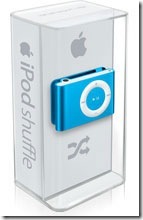 What if you want to quality music, and you constrained resources? Buy portable player without a display! It does not feel no GUI, no equalizers, it is not deplorable wowsuper3dsound functions and no display. Or without all this can not do? Looking flash iPod shuffle, we will try to answer this question.
History
Player iPod shuffle born much earlier than iriver S07. However, the very idea of the development and launch of a massive sales of digital flash-player, in the construction of which is not provided for the display, is not new. Apple echoes here of eastern dynamic market. It is a tribute to another in popularizing asketic and simple way of your product. Just a year ago, news headlines electronic publications shows another unexpected and "insolent" product from the company Steve Jobs (founder and current president of Apple). If it were a hitherto unheard of and unprecedented player, the emergence of the fault which was rampant fantasy genius and developers involved in the State of California companies. All the somewhat different than it appears a cursory familiarity with the topic of conversation. Eastern special (mostly Korean) long before Apple make release from his blacksmith playrs "blind". They not only display absent, but a carrier of information and as such all-out only thing necessary: the connector for memory cards, a few buttons, the traditional plastic shell "with" nachinkoy of Sigmatel, slabenkim battery and a couple of primitive controllers. These masterpieces, even by our standards face-dime $15-20. Tempting, but also a dangerous to the extreme. According to consumer feedback, such players served short. Obviously, it is linked with the desire of producers to save on the assembly. Controls quickly went down, cheap plastics in a couple of weeks already taken part in the form of obscene and neakkuratnoy exploitation, and their work does not vary enviable stability. It is appropriate in this case there remember as a playback music in a digital format? In short, it was necessary to refine the idea a little bit and add a bit of advertising, which was done under the banners of Apple. In light appeared iPod shuffle.
Then followed quite logical and predictable move by the iriver-training alternative player without a display. Why not guessed yet to issue earlier question. It is a question of iriver - S07 and its seychas-to in official sales in the territory of our country not only by the company and the IRR, we have the opportunity to write a review, using a sample test player, which you can see in the very near future.
Design
We now have a great opportunity to give deployed description and describe some details.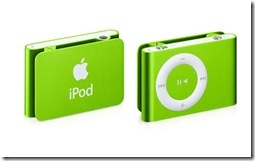
Packaging Material-anodised aluminum. In recent years, this alloy has proven itself with the best hand and was widely read as a universal obramlenie for high-tech devices. Among its consumer characteristics indicate a high resistance to pollution and physical damage, as we rushed to verify.
During testing has been forced to shuffle the test, which handled as perfect. Several falls from a height of a half meters at the concrete floor, he endured almost painless-on the surface of Yele remained visible damage. The most visible traces of the shell may appear in a tight physical contact with a solid material (glass, metal) or ostrougolnymi objects. Similar properties have plastic, but unlike the aluminum shell, he has to lose his characteristic appearance during a long operation. However, recent approval for, depending on the type of plastic, its properties can change.
Part of the construction corps is a special klipsa-prischepka located on the back of the player. Place "planting" any item can be a wardrobe: lapel jacket, strap bags, binding jackets, belt-list can be endless. Since the first days of use prihodish unwittingly concluded that the case could not be player. Fixed quickly, conveniently and without redundant headache. During the test (2 months) Clothes-pin has not changed the nature of his conduct: stiffness remained the same, and the design has remained in its original form, and there is no hint of play.
Office player being accomplished chetyrehpozitsionnogo wheel, and two additional knopok-slayderov. The first is responsible for the inclusion / disconnection of nutrition, and the second translates playback mode of the "red line" in the "mixed" and back. First-mode playback songs in the order in which they were written in memory of the player. The second mode has received its name from the English word shuffle (literally, "reshuffle", "Move") and is characterized by arbitrary playback compositions. Admittedly, such a miserly set of controls to more than cover enough.
LED is the only way to know at least some information on the status of the battery and the player in particular. Green light-well, the orange-battery is running out / charged, red-battery charge is coming to an end. Less common signals characterized by alternating green and orange. For example, if there is an error in the shuffle green turning orange every two seconds. Frankly, no player would be damaged separate battery indicator, and itself maloinformativnaya signal system.
During the Test player has proven itself as a reliable and convenient portable audio device. Its features will be evaluated, people leading active lives associated with high mobility. iPod shuffle leaves for maximum freedom movements and, in extreme situations will show itself with the best hand.
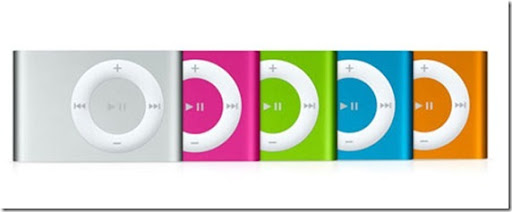 iPod shuffle + iTunes = Love
Attention shuffle without iTunes as a Romeo-Juliet-free could not exist. Will either live with it either renounce the acquisition of the player. Absurd, but complete with shuffle than headphones, a tiny dock, and the instructions did not. Program player can own iTunes download from the Apple site, or find any other source of distribution. To explain this phenomenon from the perspective of a reasonable rather difficult. Maybe pack wanted to retain as tiny as the player himself? Or simply save on the pig? Or, every member of the western society has access to the Global Wide Web? Let the case, but our situation is somewhat different situation.
Through iTunes happening recording music, as well as synchronization of musical compositions written on a computer with a shuffle. This resulted from the very inextricable link between the two Apple products. The interface is simple interface for maximum understanding. Almost all transactions committed by the method Drag'n'Drop, that is normal movement of objects in the folder and iTunes, respectively, in the shuffle. The best way to create a list of pre-play for the program itself and it has to synchronize with the player. This is the most convenient and quickest way to write music for the beloved iPod sufficiently establish several folders in pley-list, and after a couple of minutes the entire list to shuffle songs will be updated.
Despite all claims against the tandem iPod + iTunes adherents of the "digital freedom", uzrevshih benefit rid of every attachment to the Hardware Software (hardware to the program), it should be noted groundlessness of such attacks. Among the criticisms may be the most objective and meaningful: "I write music with a convenient opportunity to replicate player without using additional software." Indeed, one such way is more acceptable if within a short time had to work with several computers (for example, in the office, at home and in a guest). In this case, better to get a portable audio without reference to a certain software. But buying some "mobile freedom", it is expected fall of comfort with the player. For instance, surf on the music archives, choosing individual songs from the multi-level structure with the genre, album and artist, is a very thankless and rather tedious. iTunes through this process eliminates synchronization current (current) playlists with the shuffle.
Remember, buying shuffle, ready to become an active user of iTunes software. Let this vision of you are not intimidated. Scary it is to be misleading. Yet, surprisingly cool, iTunes now one of the most convenient tool for reproduction and structuring an extensive music library. It can connect additional modules (Plug), codecs, as well as for functional limitations does not. In addition to music, iTunes reproduces video, writes disks (and rewrite music files on the computer with the original Audio CD), has direct access to a database of information about songs, as well as providing access to one of the largest digital stores for the implementation of musical works.
Apple to taste
Remember Apple players, expect something unusual, if not the best that could be expected only from portable audio. Vyderzhivaya traditional style, the California company produced another version of the desired player. How? As simple style here united with the "technical" nachinkoy not poskupivshis on USB controller, optimizing sound conclusions and bringing power consumption to a minimum. Consider all three components in more detail. 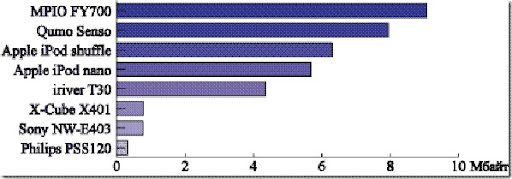
Speeds data pozaviduyut not only flash-players. Average speed reading from memory is of the order of 6,3 Mbytes / s, a record - 3,8 MB / c. As the table shows, the result of one of the highest.
Approximately 12-13 hours, the player can develop without charges and breaks at the middle level, complete with volume control and headphones. Nothing-eminent figure for the traditional fleshek. With the dramatic use of the battery had to reload every 4 days. The very same process takes about replenishing charge four times, and in the first two happens filling 80% of the resources battery.
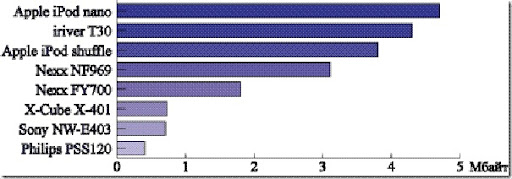 Finally, on subjective matter-of sound. With good "colors" and with due account as the shuffle creates miracles. Frequency response pleased even materyh hits, but the complete head-to expectations rather mediocre product. For understandable reasons, and no player in the Equalizer-adjust songs can be only through iTunes or editor sounds like SoundForge him and such.
Conclusion
Apple iPod shuffle for audio-active and progressive people. Practicality player advantage coupled with style, convenience and, most importantly, with quality sound. Despite the obvious benefits to evaluate their dignity, few can. Someone deterred absence display of player someone wants something more than just music, but much of its audience among fans shuffle undoubtedly emerge. The most important thing is to remember that the player is not for everyone.
As for the comparison of the old model and the new iPod shuffle, there is a lot of controversy. On the one hand, the new shuffle has grown smaller, compact, convenient, on the other hand, lost a USB plug and acquired II.zipType. Because the last player is difficult to use as flesh-brelka and perepodklyuchat it to other computers, the real headache.
After a long series, and the polls still prihodish thought to the conclusion: the bulk of the functional bloat (games, video) in the players simply do not need. You understand it is already in the first week of use iPod shuffle player. Indeed, why all these toys when almost every resident in town these days have a mobile phone, and many have a pocket computer? Is it worth duplicating the functions of these devices in the player? Rather no than yes. And this idea in the shuffle built an absolute. The device is suitable only for the reproduction of music, and perhaps to some extent to store small amounts of information. And all alone. The last word, as always, is yours. One can only wish the best of luck in choosing.
